Article
Guide to Amazon Suppressed Listings in the Semantic Search Era
If you sell on Amazon, you may have noticed some images or listings being suppressed in search without knowing how to fix them or why they were flagged in the first place.
Although Amazon compliance is complex, it used to be relatively straightforward; if sellers followed a simple checklist of what to do versus what not to do, they could generally reduce suppressed listings. But now, the way that Amazon approaches listing suppression is changing.
With the introduction of AI and a new focus on Amazon semantic search, the list of what sellers need to pay attention to is longer, and the actions you may need to take to improve listing quality are less intuitive.
In this article, we’ll break down how semantic product search works on Amazon, why you may be seeing an uptick in suppressed listings, and what actions brand managers should take to avoid running into issues.
The Amazon 2026 Semantic Glossary
To understand this new era of semantic-driven suppressions on Amazon, one must understand the evolution of search and compliance. Amazon has moved beyond simple word-matching into the realm of intent-based enforcement.
Here are some key definitions for your Amazon glossary:
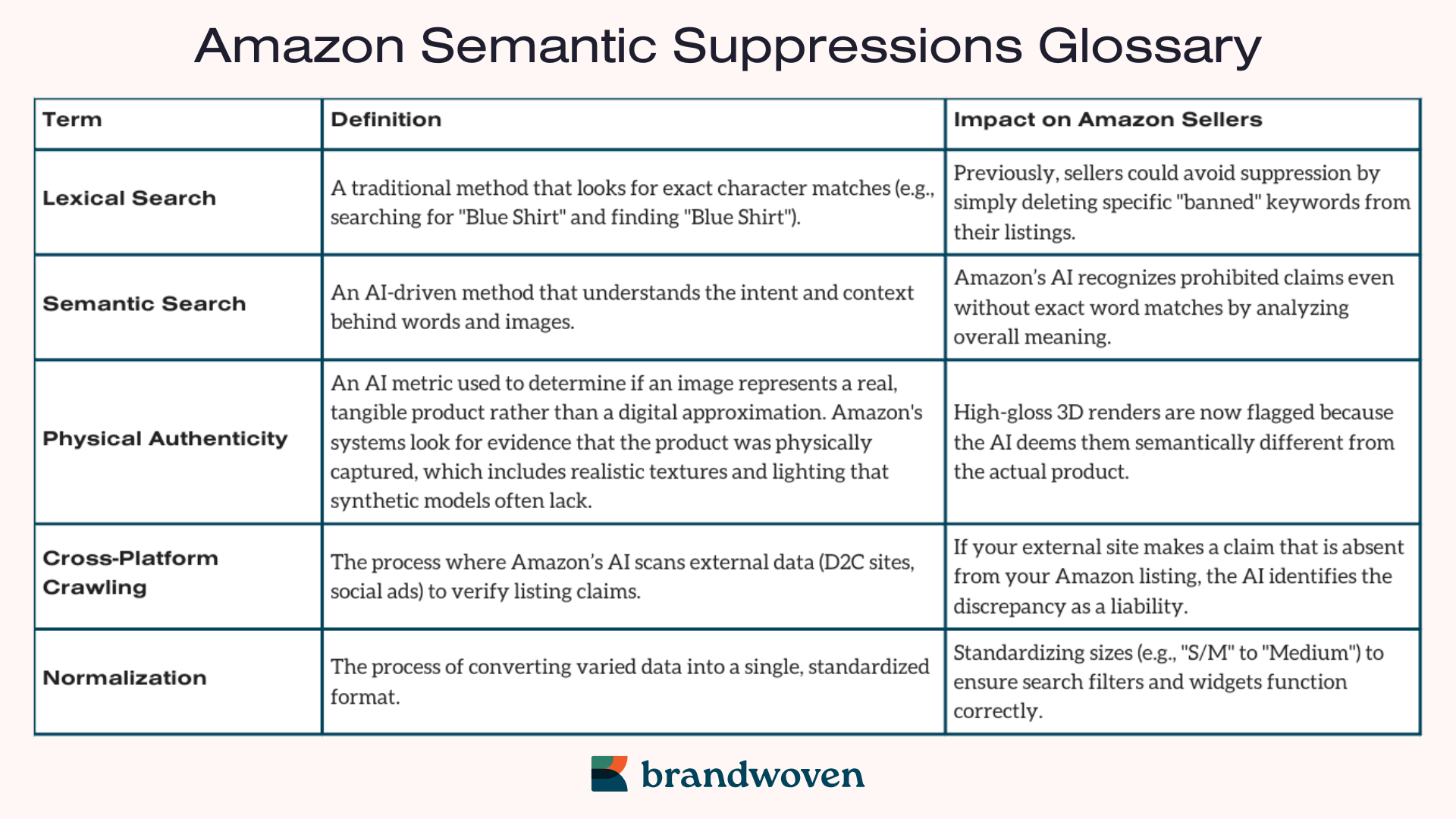
- Lexical Search: A traditional method that looks for exact character matches (e.g., searching for “Blue Shirt” and finding “Blue Shirt”).
- Previously, sellers could avoid Amazon suppressions by simply deleting specific “banned” keywords from their listings.
- Semantic Search: An AI-driven method that understands the intent and context behind words and images.
- The AI recognizes prohibited claims even without exact word matches by analyzing overall meaning.
- Physical Authenticity: An AI metric used to determine if an image represents a real, tangible product rather than a digital approximation. Amazon’s systems look for evidence that the product was physically captured, which includes realistic textures and lighting that synthetic models often lack.
- High-gloss 3D renders are now flagged because the AI deems them semantically different from the actual product.
- Amazon’s goal is to ensure customers see an accurate representation of what they are buying, so this should be your focus to avoid a search suppressed status.
- Cross-Platform Crawling: The process where Amazon’s AI scans external data (D2C sites, social ads) to verify listing claims.
- If your external site makes a claim that is absent from your Amazon listing, the AI identifies the discrepancy as a liability and triggers a listing suppression alert.
- Normalization: The process of converting varied data into a single, standardized format.
- For example: Standardizing sizes (e.g., “S/M” to “Medium”) to ensure search filters and widgets function correctly.
Amazon Assets Flagged for Suppression
Amazon Listing Suppressed Images (Computer Vision Driven)
Amazon’s Visual Compliance AI now scans for specific attributes that previously required manual reporting with the goal of standardized, physically authentic shopping experiences.
- The Death of Renders: Amazon is now suppressing main images identified as 3D renders or high-gloss synthetic AI generations. The platform is prioritizing physical authenticity for Hero images to set realistic customer expectations.
- The 85% Frame Rule: An 85% product-to-frame rule is now strictly enforced by auto-cropping images or suppressing listings.
- Lifestyle Restrictions: There is now a hard suppression of any main image that includes a model, setting, or prop.
- Background Precision: The AI now detects near-white backgrounds (e.g., #FEFEFE) but only #FFFFFF is compliant. All others trigger an Amazon search suppressed status.
- Text Density: Any secondary image with text/graphic overlays covering more than 20% of the total image area is being suppressed for clutter.
- Medical Comparisons: In Beauty and Health, visual “Before/After” comparisons, even in A+ Content, are being suppressed as unverifiable medical claims.
Text & Metadata: The “Mobile-First” Mandate
Amazon has tightened character counts and formatting to improve mobile shopping experiences and ensure UI consistency.
- 80-Character Title Limit: In Clothing and Accessories, titles exceeding 80 characters are being suppressed from search results to prevent mobile layout breaking.
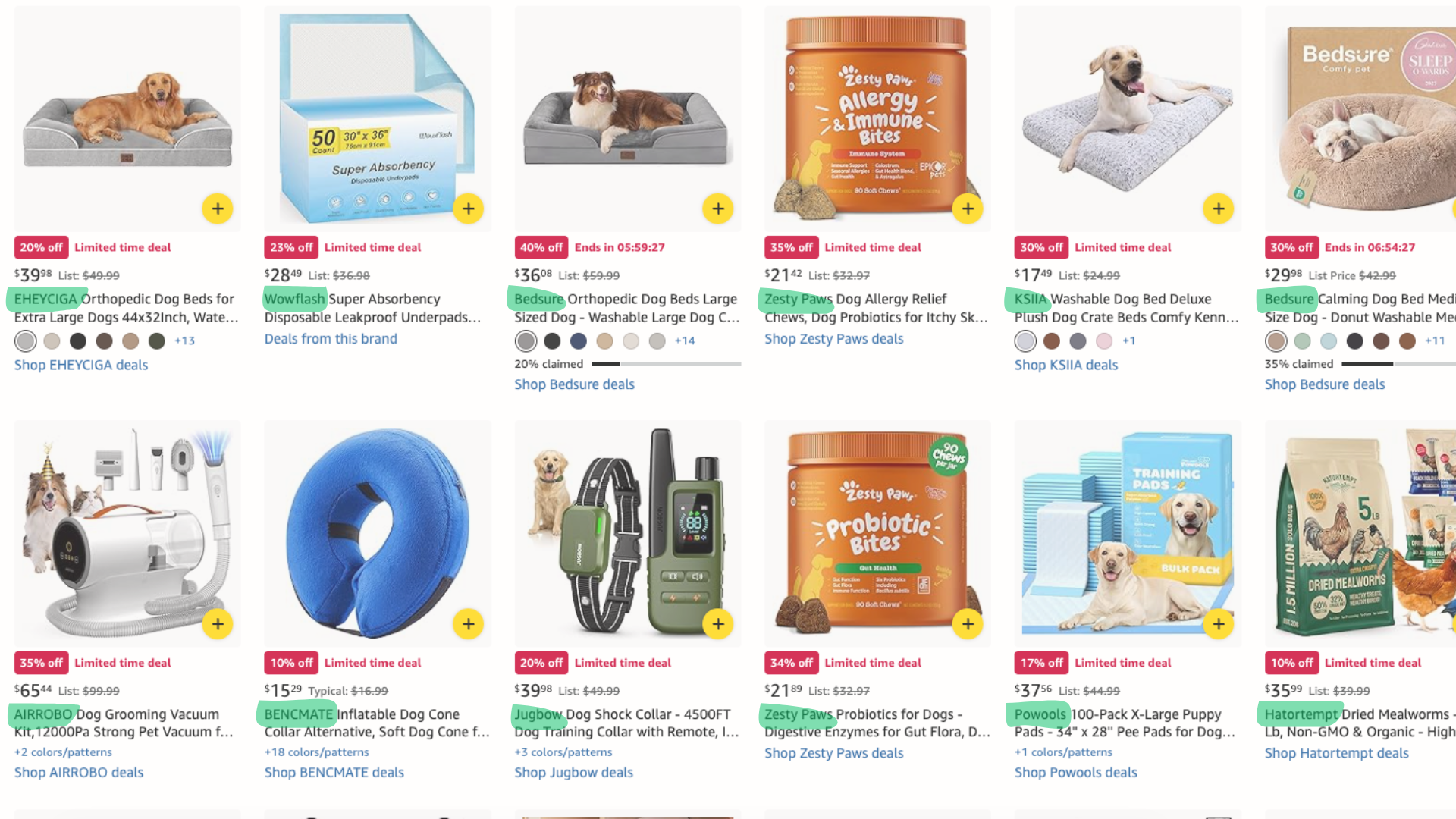
- Brand-First Requirement: Any title not starting with the Brand Name is subject to immediate search suppression (see screenshot below of Amazon’s Pet Supplies deals page).
- Special Character Decoration: The use of emojis, excessive symbols (!!!, ***), or characters like ™ or ® in titles now triggers an automated quality alert.
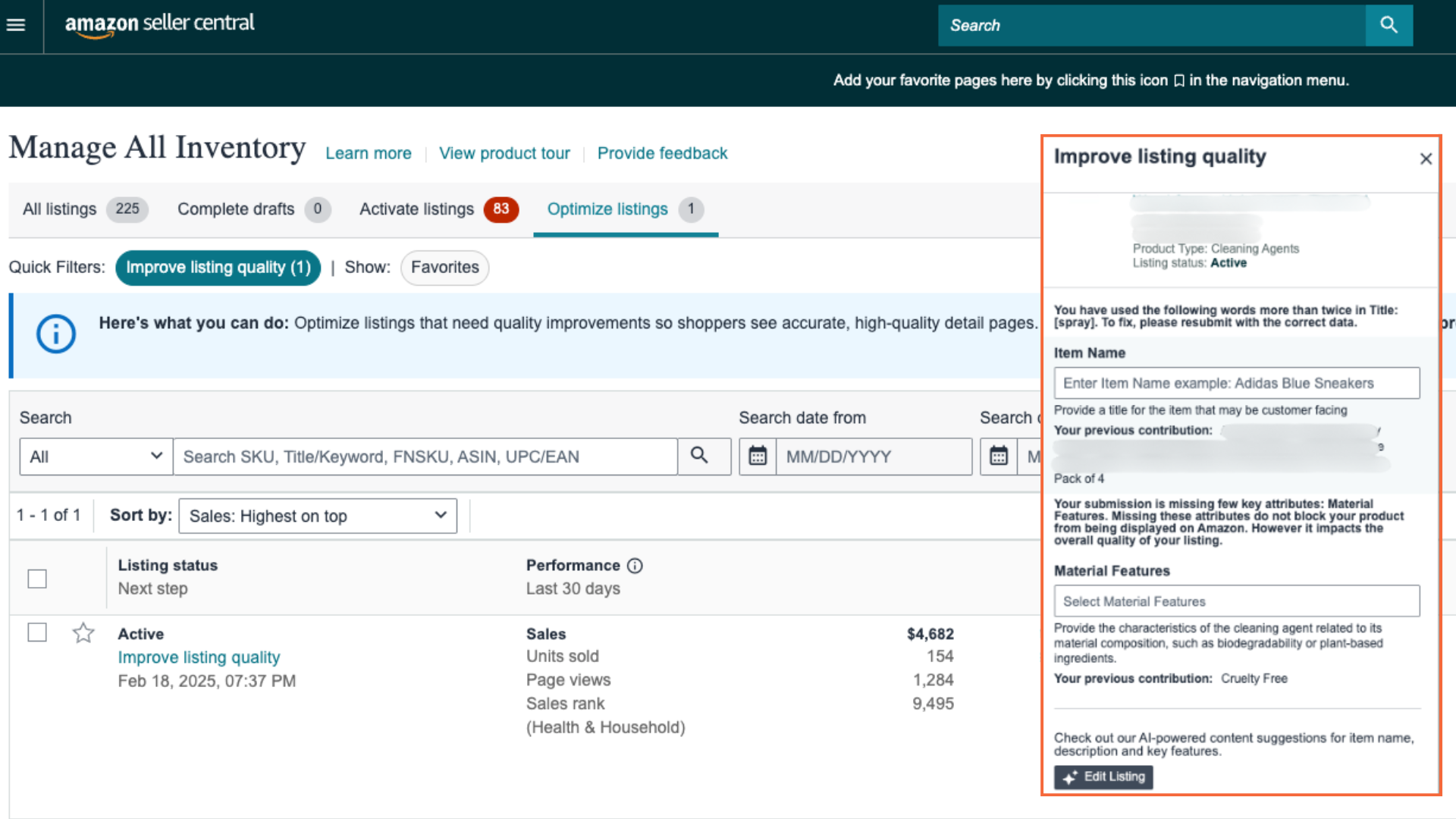
- Keyword Repetition: Titles containing the same word more than twice (e.g., “Blue Shirt Mens Blue Shirt”) are flagged as keyword stuffed and result in an Amazon suppressed listing.
- External Spillover Claims: Amazon’s AI now crawls external websites. If your D2C website makes a claim (e.g., “FDA Approved”) that isn’t on the Amazon listing, the listing is suppressed to avoid regulatory liability.
Sizing & Fit: The Normalization Initiative
As of late 2025 and moving into 2026, Amazon has begun systematically suppressing manual size chart images from the listing image carousel. This is a mandatory shift toward an automated, AI-driven sizing ecosystem designed to reduce return rates and improve listing quality on Amazon.
- The Dynamic Size Chart Image: For some mobile shoppers, Amazon’s AI is now auto-generating a size chart image and inserting it directly into your mobile image carousel. This is not an image you uploaded; it is synthesized by Amazon using backend catalog data to ensure a consistent mobile viewing experience.
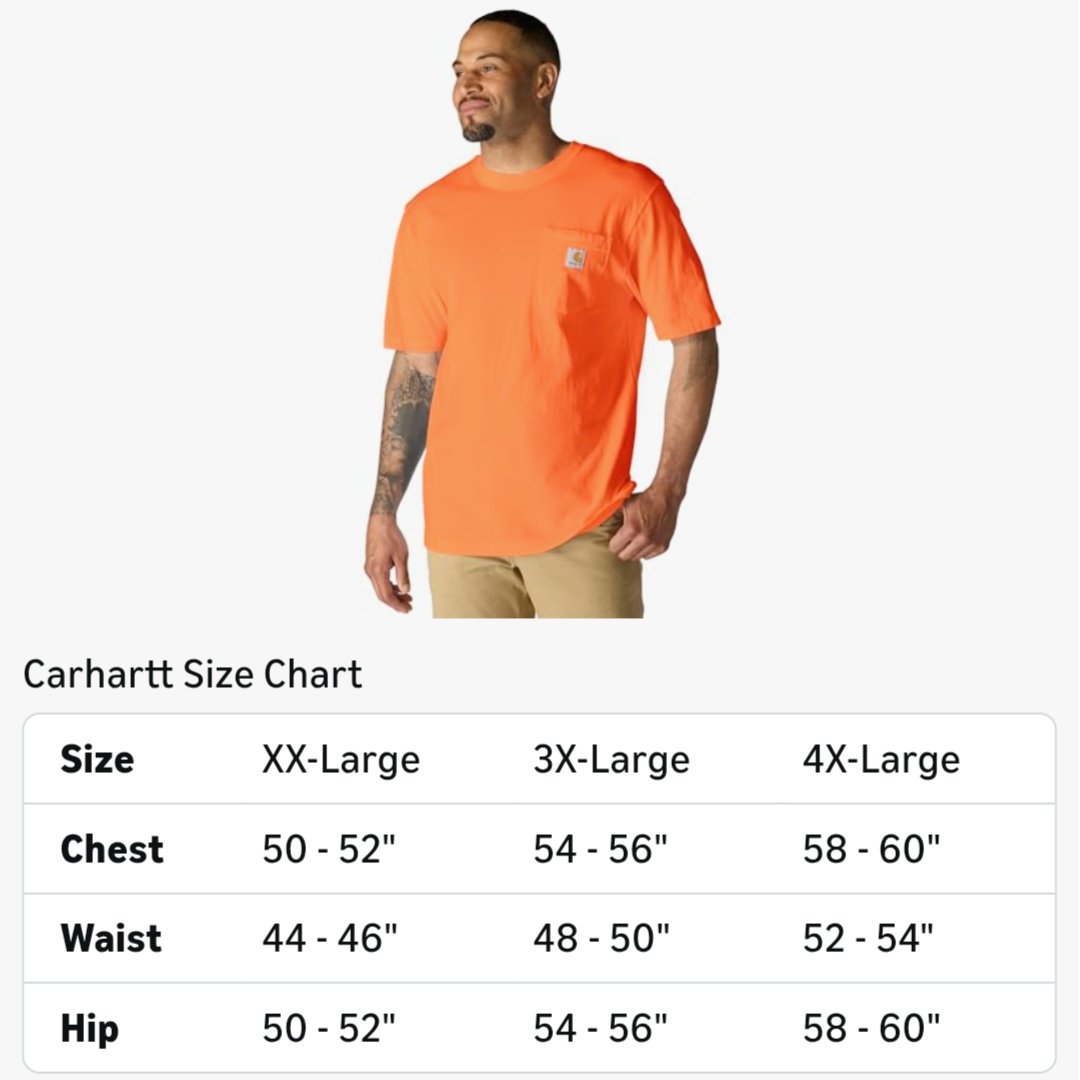
- Image-Based Size Chart Suppression: Amazon is actively removing traditional, static size chart images from the gallery. If a listing has both a manual image and a dynamic widget, the manual image is suppressed to prevent customer confusion or inconsistent data.
- The Self-Serve Source of Truth: To regain control, brands must use the Self-Serve Size Chart Tool (Catalog > Add Size Charts). Data uploaded here is considered the official brand data, overwriting Amazon’s AI-generated guesses and populating the dynamic carousel images.
- Normalization of Values: Sizes like “One Size Fits All” or “S/M” are being suppressed in favor of normalized values (e.g., “S”, “M”, “L”) to ensure search filters and the dynamic widget function correctly.
- Missing Backend Attributes: Listings in Clothing, Shoes, and Jewelry that lack “Length,” “Width,” or “Height” in the backend are being hidden from fit-based search results.
Size Chart Workarounds
While Amazon is aggressive about standardizing the main image gallery, there are currently two ways to provide custom sizing context:
- The Model Stats Lifestyle: To bypass chart detectors while still providing sizing context, use a lifestyle image of a model with a simple text overlay: “Model is 5’10” wearing a size Medium.” Because this lacks a grid or table, automated filters often categorize it as a lifestyle infographic rather than a prohibited size chart.
- A+ Content Comparison Charts: Amazon is currently less aggressive about suppressing sizing data within A+ Content. While they have signaled future standardization here, A+ Content remains a viable place for detailed, brand-specific sizing graphics – for now.
Operational & Fulfillment Suppressions
New for 2026, these suppressions target the logistical integrity of the marketplace.
- End of Amazon Prep: As of January 1, 2026, Amazon has ended all in-house prep and labeling. Listings still set to “Amazon Preps” are being suppressed at the fulfillment level (made “Inactive”) until switched to “Merchant Preps”.
- The FNSKU Mandate: With the phase-out of the commingled inventory program, any listing using a Manufacturer Barcode (UPC) instead of an Amazon Barcode (FNSKU) is suppressed from the Buy Box to combat counterfeit risks.
- Price Parity: If your D2C website offers a significantly lower price than Amazon, the listing is suppressed from the buy box (becoming “See All Buying Options”) under the marketplace’s Fair Pricing Policy.
2026 Auditing Checklist to Prevent Amazon Suppressions
To stay ahead of semantic product search sweeps and potential listing suppressions on Amazon, use this workflow to audit your catalog.
Step 1: Logistics Alignment
- Update prep settings to Merchant Preps for all listings.
- Transition from UPC barcodes to FNSKU barcodes to maintain buy box health.
Step 2: Semantic Adjustments
- Review your D2C site for any claims (Medical, Pesticide, or Guarantee) that are banned on Amazon, as the AI now syncs these platforms.
- Harmonize your messaging to prevent external spillover suppression.
- Trim mobile titles to 80 characters or fewer for Apparel/Accessories.
Step 3: Visual Integrity
- Ensure your main image background is exactly #FFFFFF.
- Audit your “Hero” images to ensure the product occupies 85% of the frame.
- Replace any synthetic-looking 3D renders with real photography to pass the physical authenticity test and avoid suppressed images on your Amazon listings.
Step 4: Apparel Enrichment
- Ensure every SKU has its physical dimensions filled in the backend to remain in search filters.
- Move all size chart data into the Size Chart Self-Serve Tool in Seller Central to prevent the AI from “guessing” measurements.
- Convert suppressed size chart images into lifestyle shots with text overlays to maintain visual sizing cues in the main carousel.
Frequently Asked Questions (FAQs)
What is the difference between search suppression and inactive status?
A search suppressed Amazon status means your listing exists but won’t appear in search results. Inactive status (often caused by fulfillment errors) means the listing is not live on the marketplace.
Can I still use AI to create my images?
Yes, but they cannot look “synthetic.” Amazon’s Visual Compliance AI scans for high-gloss, unrealistic textures that lack physical authenticity, which often leads to a suppressed Amazon listing.
Why is Amazon suppressing 3D renders if they look high-quality?
Amazon is suppressing listing images with synthetic renders to prioritize real-world images for the Main/Hero image slot.
Does the “20% Text Overlay” rule apply to A+ Content?
Currently, the 20% density rule targets secondary images in the listing image carousel. However, visual Before/After comparisons are suppressed even in A+ Content.
How does Amazon know what is on my D2C website?
Amazon semantic search technology now crawls your brand’s D2C website with a goal of identifying discrepancies in claims to flag them as regulatory liabilities.
What happens if my title is over 80 characters?
For Apparel brands specifically, titles over 80 characters are suppressed from Amazon search results to protect the mobile shopping experience.
Can I still use “One Size Fits All” in my sizing?
Amazon is suppressing these in favor of “Normalized” values like “S”, “M”, or “L” to support standardized search filters, so this is not recommended for anyone trying to improve their listing quality on Amazon.
Why are there size chart images in my mobile carousel that I didn’t upload?
Amazon’s AI is now auto-generating “Dynamic Size Chart Images” from your backend data to replace suppressed manual charts and ensure mobile consistency.
Conclusion
The recent transition to AI-driven compliance on Amazon means Brand Managers must be more proactive than ever to avoid suppressed listings.
We recommend starting by auditing your Listing Quality Dashboard to find out how to fix your search suppressed listings on Amazon (In Seller Central, go to Inventory -> Manage All Inventory -> Optimize Listings).
Protect your brand’s visibility in this new Amazon semantic search era by staying up-to-date on Amazon’s account management tools and policy documentation.