Introduction
Did you know that up to 60% of your Amazon Sponsored Product (SP) campaign budget could be serving ads in placements you never intended to target?
Many Amazon advertisers assume that when they launch a keyword-based sponsored product campaign, their ads primarily appear within search results. This assumption drives how marketers interpret performance data, make bidding decisions, and scale campaigns. However, Amazon’s ad distribution system often sends a significant portion of impressions and clicks to product detail pages, even when campaigns were designed to capture search-driven traffic.
Because these ad placements are blended together in Amazon marketing campaign reporting, many marketers unknowingly make decisions based on misattributed data. A keyword may appear profitable, when in reality the conversions are coming from detail page placements. Alternatively, an Amazon marketing campaign may look inefficient because a large portion of ad spend is being directed toward low-intent placements.
The result is wasted ad spend, distorted strategy, and missed opportunities to grow incremental revenue.
In this article, we’ll explore where Amazon places sponsored product ads, why detail page placements can quietly erode campaign efficiency, and how marketers can restructure campaigns to ensure ad spend is actually driving total revenue growth.
3 Areas Amazon Sponsored Product Ads Can Be Placed
Amazon sponsored product ads can appear in three primary placement types, each representing a different stage of customer intent. Understanding the behavior of each placement is critical for interpreting performance correctly.
1. Top of Search (Top of Page)
Top of Search (ToS) placements appear at the very top of the search results page, above organic listings. This is widely considered the premium placement within Sponsored Products due to its high visibility and alignment with customer intent.
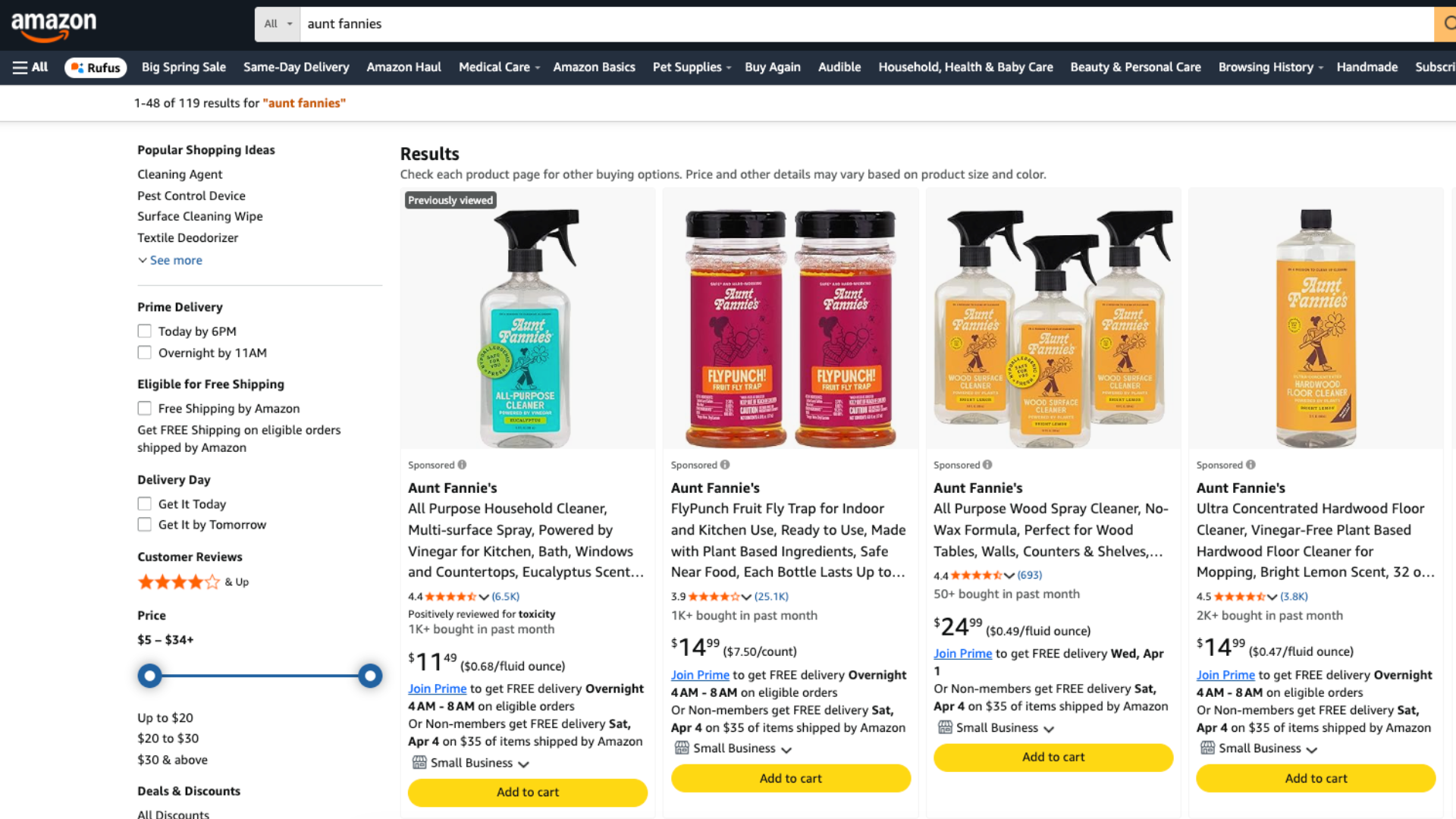
These placements see:
- Higher CTR and CVR: Because shoppers are actively searching for a product, these placements tend to drive stronger click-through and conversion rates.
- Higher CPCs: Competition for these placements is intense, which drives up cost-per-click.
- Best for high-intent keywords: ToS tends to perform best for branded searches, category leaders, and highly relevant keywords.
For many advertisers, Top of Search placements generate the majority of profitable search-driven conversions.
2. Rest of Search (Middle/Bottom of Page)
Rest of Search (RoS) placements appear further down the search results page, either within the middle of listings or toward the bottom.
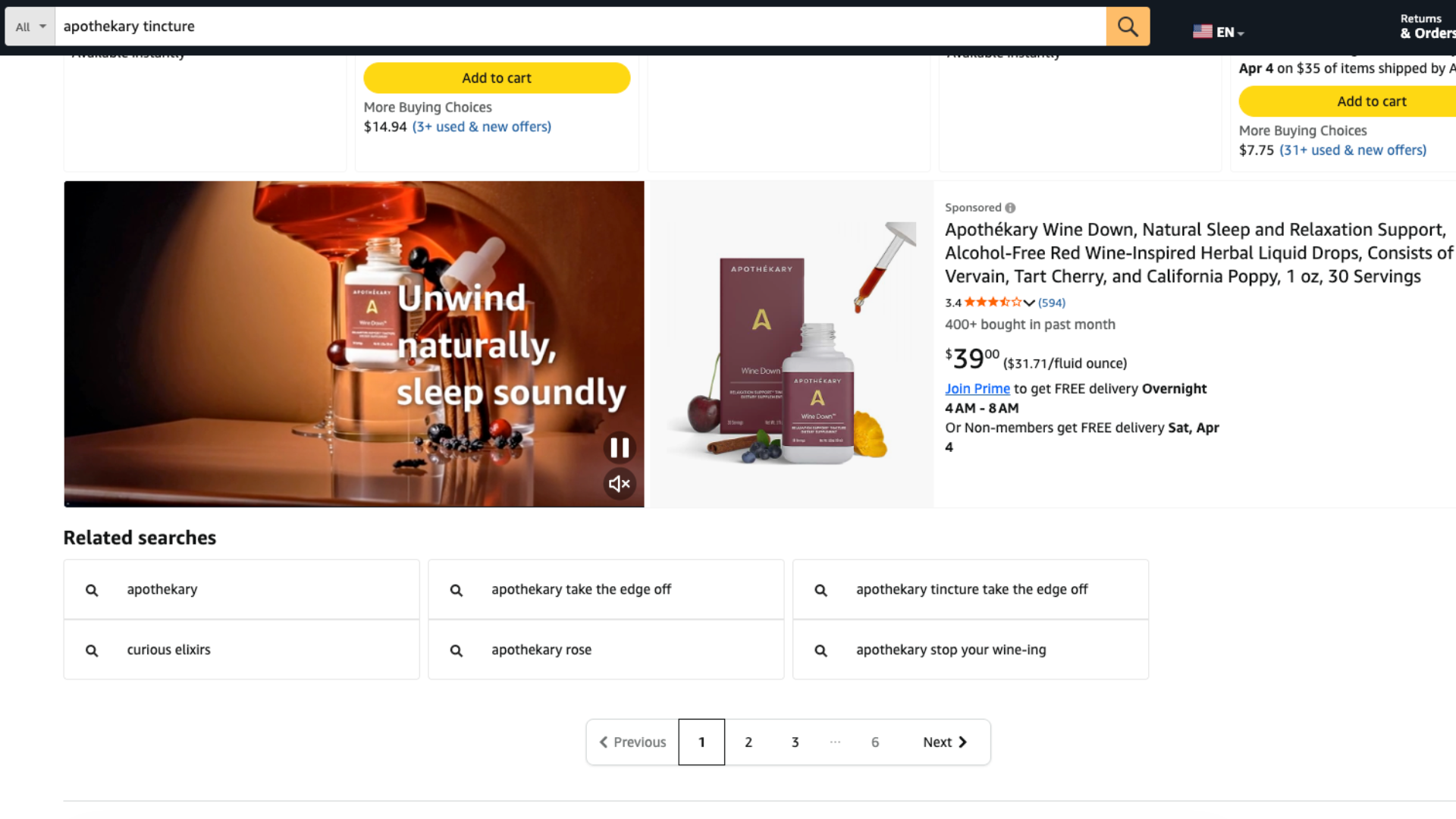
These placements see:
- Lower visibility than ToS
- Lower CPCs
- Higher impression volume
Although these placements receive less visibility, they can still be vital for gaining efficient, low-cost traffic. Performance metrics such as CTR and CVR are typically lower compared to Top of Search because shoppers have already seen competing products above.
RoS placements are a great tool to help scale, capturing incremental clicks while maintaining acceptable efficiency.
3. Product Detail Pages
These ads appear directly on product listings, often underneath the buy box or within the “Sponsored Products related to this item” carousel.
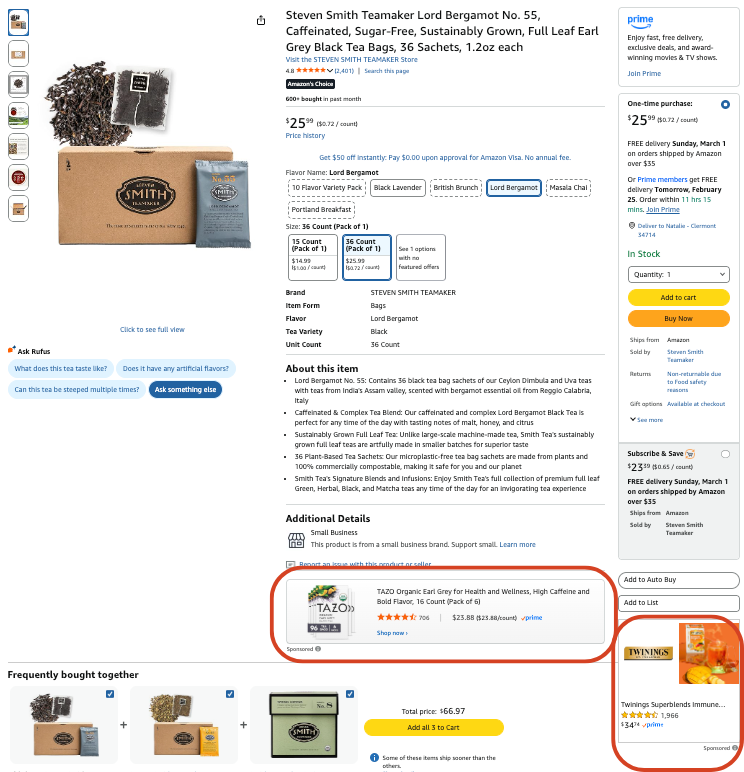
Instead of searching, the shopper is already evaluating a specific product. Ads here function as interruption marketing, attempting to redirect attention away from the current product.
Because of this behavioral difference:
- Customers are browsing rather than searching
- Clicks can be more exploratory
- Conversion rates can vary significantly
Detail pages can perform extremely well when targeting complementary products or weaker competitors, but performance tends to be less predictable.
Where Sponsored Product Ad Placements Can Go Wrong
The Problem: Detail Page Placements Inside Keyword Campaigns
Optimizations are only as good as the data they are based on. ASIN placement metrics blended with keyword metrics muddy the water. Even the most adept marketers can’t make accurate decisions if 40% of their keyword attribution data is coming from non-keyword placements. In addition, conversion data for these ASIN placements within keyword campaigns tends to be extremely high. We can assume that this means these placements are mostly likely landing on branded ASIN pages (not good!).
Issues This Can Cause
Misattribution of Data
With all these placements showing up aggregated within keyword or search term reports, we get the following issues:
- A keyword may appear profitable because detail page traffic is driving the conversions.
- Advertisers may assume strong search intent, when the conversions are actually coming from competitor or branded interruption.
- Scaling decisions may be based on misleading keyword performance.
In other cases, the opposite happens. Search placements may be making up the majority of traffic within an ASIN targeted campaign. Either way, the signal becomes distorted, making it difficult to optimize effectively.
Wasted Ad Spend
Another consequence is unintentional overspending on low-intent placements. Because advertisers typically bid aggressively on high-intent keywords, those same bids also apply to detail page placements, resulting in:
- High bids applied to lower-intent placements
- Budget leaking into low-performing detail page inventory
- Inflated ROAS metrics that mask inefficiencies
- Defensive Amazon marketing campaigns competing against your own products
This results in your Amazon marketing spend, usually earmarked for growth focus campaigns, to end up going towards low-growth locations. You will continually see solid ad attributed metrics, but with no total sales growth to accompany it.
How to Fix It: Optimize Amazon Sponsored Product Spend
Fortunately, advertisers now have more tools than ever to control placement behavior.
Placement Modifiers
Placement modifiers allow advertisers to adjust bids based on placement type.
Rather than increasing base bids, many advanced advertisers use the opposite strategy:
- Lower the base bid significantly
- Increase placement modifiers for Top of Search and Rest of Search
This approach allows you to:
- Prioritize high-intent search traffic
- Reduce spend on lower-performing placements
- Improve overall efficiency
You can go a step further by separating campaigns based on placement focus, allowing each campaign to target a specific placement strategy.
For example:
- High modifier campaigns for Top of Search
- Lower bid campaigns capturing Rest of Search traffic
- Separate ASIN campaigns targeting detail pages intentionally
This structure creates clearer data signals and stronger control over spend allocation.
New Negation Abilities
Amazon has also introduced new tools that significantly improve campaign control. Advertisers can now negate both keywords and ASIN placements within a campaign, regardless of the set targeting format. This capability allows marketers to prevent campaigns from competing against themselves or appearing in placements that don’t match the campaign’s strategic goal.
What You’ll See if Done Correctly
When implementing these changes, the initial results can appear counterintuitive.
Several metrics often change immediately within non-branded campaigns:
- Ad Sales will drop
- ROAS will decrease
This may seem alarming at first, but it often reflects removal of inflated detail page conversions that were previously masking inefficiencies.
At the same time, several positive indicators should appear:
- Top of Search and Rest of Search placements increase
- Total Revenue or Shipped COGS stays the same or grows
- TACoS (Total Advertising Cost of Sales) decreases
In other words, while attributed ad sales may decline, overall business performance often improves because advertising spend is now leading to incremental sales growth.
Conclusion: Ad Placement Control is Crucial on Amazon
Placement control is one of the most overlooked levers in Amazon sponsored product optimization.
When advertisers ignore placement distribution, campaigns often bleed budget into detail page inventory that does not align with their strategic intent. This leads to misattributed data, inefficient scaling decisions, and wasted ad spend.
By analyzing placement reports, adjusting bid modifiers, and using new negation capabilities, marketers can regain control over where their ads appear and ensure campaigns are optimized for true revenue growth rather than misleading performance metrics.
The key takeaway is simple:
Control placement intentionally — don’t let Amazon decide for you.