Understanding your metrics is the foundation of a successful Amazon strategy.
Obviously, traffic in general is important for a seller to understand their Amazon business, but when reporting on product page performance, not all metrics are created equal.
If you are like many sellers on Amazon, you might be keeping a close eye on your total traffic numbers – but you could be missing the deeper narrative hidden within the data. Many Amazon sellers track page views, but sessions often tell the more important story.
In this article, we will break down the crucial differences between page views and page sessions, explain what the gap between these metrics reveals about customer purchase consideration, and show Amazon sellers how to use this data to diagnose conversion performance issues.
Definitions: What’s the Difference Between Page Views vs. Sessions?
Before diving into strategic applications, it is helpful to define exactly what Seller Central is measuring when it tracks your listing page data.
What is an Amazon Page View?
Page views are the simpler performance metric of the two, being the number of visits an Amazon product page gets regardless of whether a customer has visited that page already.
For example, if a shopper clicks on your listing, leaves, and comes back three hours later, Amazon will count that as two separate views. Because of this, views will always be higher than sessions.
What is an Amazon Page Session?
A session is tied directly to unique shoppers. This Amazon metric tracks unique visits to your detail page within a 24-hour window. Even if one shopper views your listing multiple times during this period, it is still only counted as 1 session.
Where to Find Data & Reports in Amazon Seller Central
If you are ready to review your own data, Amazon provides some helpful reporting tools which can be accessed through the backend of your Seller Central account.
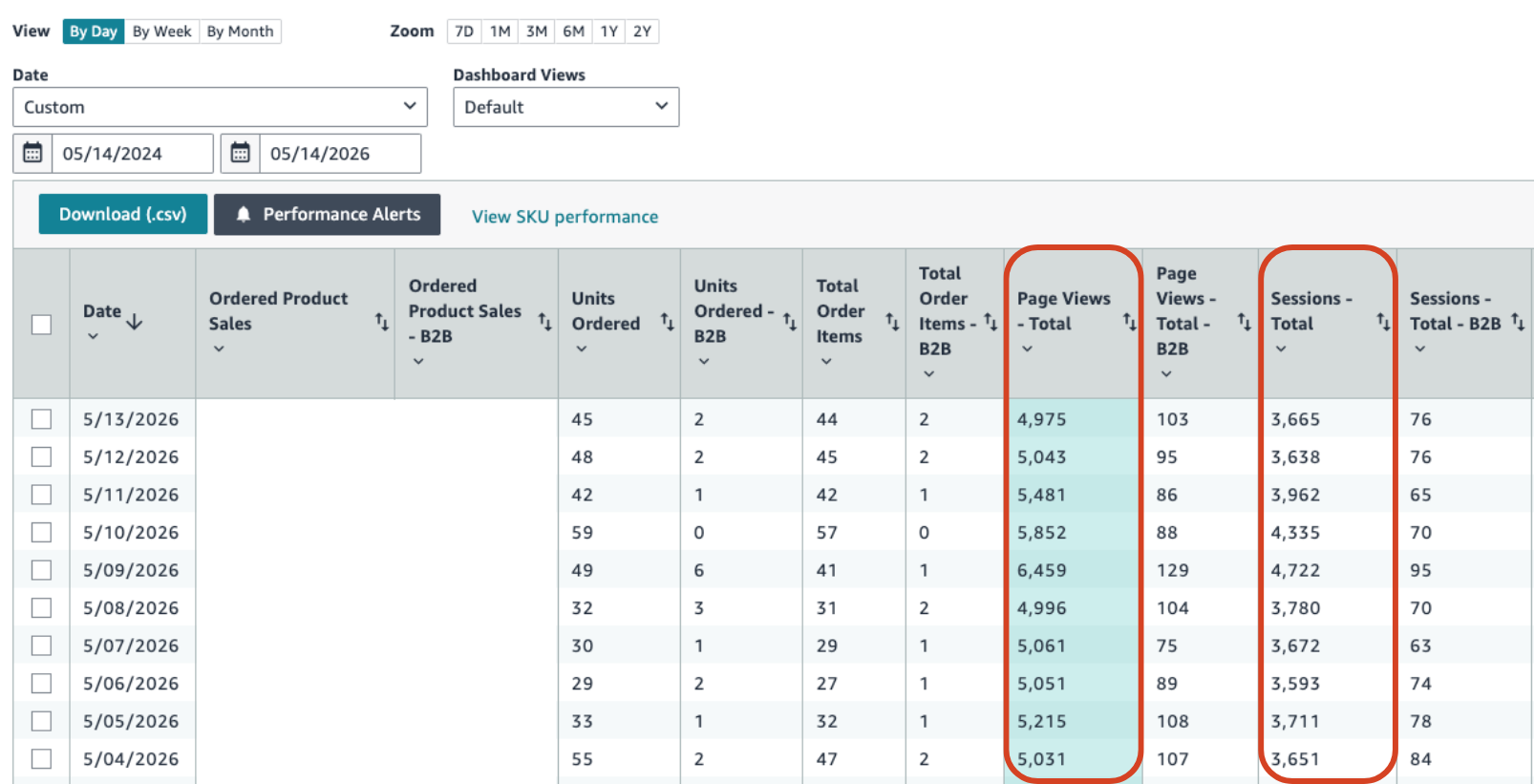
- If you’re interested in diving into your sessions and views data, you can find this in the Business Report section in Amazon Seller Central (access here).
- For sellers looking to get even more granular with their insights, we recommend utilizing Amazon’s new Custom Analytics section where you can custom tailor reports to your liking.
Why Does This Distinction Matter for Purchase Consideration?
While tracking general traffic is great for measuring the success of your top-of-funnel advertising, comparing views and sessions provides valuable diagnostic signals. Specifically, this relationship can reveal how much consideration and hesitation is happening before a customer decides to click “Add to Cart”. As a result, we recommend sellers review these performance metrics regularly to uncover any potential areas for improvement on their Amazon product pages.
To illustrate this, here a simple mathematical example:
Let’s say one of your product pages had 100 views and 50 sessions in a day. The averages tell us that in this 24-hour period, we had about 50 customers view the page 2 times, or 2 views per session. More likely, some customers viewed 3 times, some viewed once, but the average is 2.
Once you understand your baseline views-per-session average, you can plug this data into real-world business situations to diagnose your Amazon customer behavior. Let’s walk through two scenarios of what this looks like below.
Scenario 1: Shortened Purchase Consideration During Promotions
If an Amazon seller is running a major sale, such as a Prime Day event where a product is marked down with a significant discount like 20%, they will likely see a shift in these performance metrics. In this case, views-per-session may drop because purchase consideration has shortened by giving customers a better price. Because the deal is compelling, shoppers do not need to bounce away to compare prices; they view the page and purchase immediately.
Scenario 2: Increased Hesitation from Poor Customer Reviews
Conversely, what happens when your view-per-session ratio spikes?
Imagine a scenario where there is a recent issue with product quality, resulting in an influx of negative feedback from customers. The views-per-session may increase as customers consider additional products and bounce around between pages before ultimately making a decision. This activity is a key indicator of increased hesitation tied to reviews or product page issues.
The Importance of Diagnosing Amazon Conversion Gaps
Ultimately, understanding views and sessions data is about improving a brand’s bottom line. It is very important that sellers to look at their Amazon conversion rate between both metrics.
This is particularly crucial for lower-priced, consumable items where purchase consideration is natively expected to be lower. If you are selling an everyday essential that has low purchase consideration, shoppers shouldn’t need to visit the page multiple times to make a decision.
If there is an abnormally large delta between your conversion rate on views vs. sessions, this should push you to review your Amazon product page to see what could be giving customers pause before purchasing. Identifying and investigating these gaps will empower your brand to make better decisions about imagery (if a refresh would help), copy (if refinement would clear up confusion), or quality concerns (worth addressing head-on with your R&D or logistics teams).
Common Questions About Amazon Page Views & Sessions
Can page sessions ever be higher than page views?
No. Because page views count every single visit and page sessions group visits by unique shoppers within a 24-hour window, your views will always be higher than your sessions.
What does it mean if my views-per-session ratio is very high?
A high ratio means shoppers are visiting your page multiple times without buying immediately. This often indicates increased hesitation, meaning shoppers are bouncing around to consider other products. It could be tied to recent critical reviews, outdated or confusing listing images or copy, or a poor pricing strategy.
How does sales performance from running promotions during Amazon Prime Day affect these metrics?
Compelling discounts usually shorten the purchase consideration phase. As a result, you will likely see your views-per-session average drop, as customers are more likely to buy on their first or second visit to take advantage of the deal.
Where can I look at my views vs. sessions in Amazon Seller Central?
You can find these metrics by navigating to the Business Reports section in Amazon Seller Central. For more advanced tracking, you can use the Custom Analytics section to build tailored reports. If you need any assistance building reports, analyzing performance, or improving your product page content, reach out to our team.
Stop Guessing & Start Growing on Amazon with Brandwoven
If you find yourself staring at an abnormally large delta in your Amazon metrics and don’t know how to fix your product pages, you don’t have to navigate it alone.
Understanding the nuanced difference between page views and sessions is just one piece of the Amazon puzzle. Amazon data can be overwhelming which is why our team would be eager to jump in and help your brand translate any confusing data into actionable growth strategies.
Whether you need help diagnosing data gaps, managing negative reviews, or fully optimizing your Amazon Seller Central account, our experts are here to guide you.
Don’t let customer hesitation cut into your profits. Reach out to us today and let’s ensure your Amazon page views turn into conversions.