Amazon’s ad console was built for accessibility, not transparency. The gap between how the platform appears to work and how it actually works is where marketing budgets and performance data quietly erode and mislead. Most marketers operating on Amazon are doing so under a set of assumptions that are not just incomplete but functionally incorrect.
Disclaimer: Amazon frequently updates its advertising platform, so matching behavior and placements may evolve over time.
Three of the most common beliefs about Sponsored Ads cost brands real money every day. Here is what they are getting wrong, and what to do about it.
Assumption 1: “Exact Match Means Exact” -> Wrong
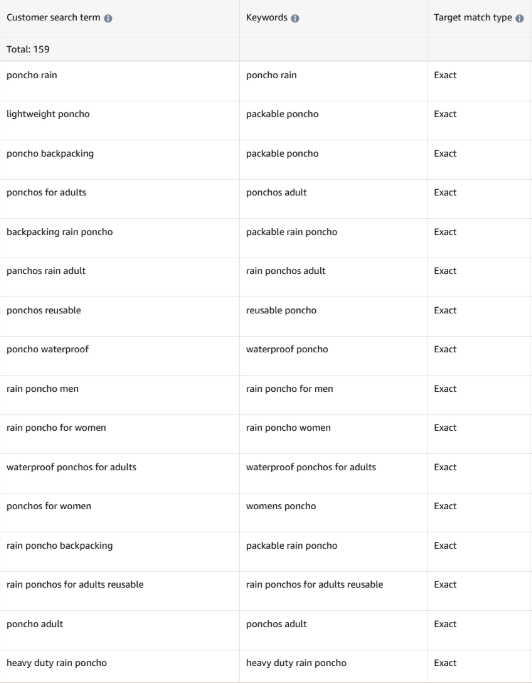
It sounds airtight: you enter a keyword in exact match, and your ad only serves when a shopper types that precise query. In reality, there are instances where the “exact” match isn’t so exact. Amazon applies close variant matching by default, meaning your targeting is broader than your ad campaign structure suggests.
Amazon treats singular and plural forms as equivalent under exact match. For example, if you are targeting “fishing lure,” your ad can serve on “fishing lures” and vice versa. If you’re not aware of this, you could accidentally be skewing search term data, inflating perceived keyword coverage, or pulling spend toward unintended variants.
Beyond plurals, Amazon also ignores or substitutes certain prepositions, hyphens, and spacing variations. A keyword like “bottle for baby ages 0-6 months” will serve on “bottle for baby ages 0 to 6 months” as well. As a result, your exact match keyword list is less precise than it looks, and search term reports reveal a wider net than intended.
It is often the case where one variant of the keyword sees better metrics than the other. An experienced marketer would want to ensure that bids are specific to only the highest performing queries.
The “exact” misnomer is even more drastic within Sponsored Brand campaigns. Sponsored Brands often expand to semantically related search terms more aggressively than Sponsored Products. While Amazon doesn’t disclose the exact matching logic, advertisers frequently observe Sponsored Brands serving on related searches that extend beyond traditional close variants.
How to Fix It
Build a proactive negative keyword list at the campaign or ad group level using search term report data (found within each campaign or under the Measurement & Reporting Tab in the Ad Console) to block close variants you never intended to serve on. Ongoing harvesting from search term reports is essential, not optional.
For variants you do want to target intentionally, isolate them in dedicated ad groups or campaigns. That gives you independent bid control and cleaner performance data for each variant, separating intentional coverage from Amazon-assumed coverage.
Assumption 2: “A Keyword Target Places Ads in Search Results Only” -> Wrong
This is one of the most widely held misconceptions in Amazon advertising. Keyword-targeted Sponsored Products campaigns do not limit delivery to search results pages. Amazon serves those ads in additional placements that most marketers never account for.
Keyword-targeted SP campaigns can serve on product detail pages as a result of Amazon’s targeting logic. That means your keyword campaign is competing in a placement that behaves like a product targeting campaign with meaningfully different conversion intent, click behavior, and competitive dynamics. These ASIN placements are also attributed to keywords within the targeting report, leading to incorrect assumptions about targeting efficiency.
The reach extends further than that. Amazon also delivers SP ads beyond its own marketplace through placements on off-platform websites. If you are running keyword campaigns, you may be funding off-Amazon impressions without realizing it, and visibility into that traffic is limited within the standard ad console reporting view. This isn’t inherently bad, but there are no insights into where these ads are being served off-site or any way to control which sites they end up on.
How to Fix It
Apply negative ASIN targets or negate brands within keyword campaigns to limit detail page bleed if that is not the intent of the campaign.
Use bid adjustments by placement to de-prioritize product pages relative to top-of-search. Reducing the product detail page bid modifier limits exposure in that placement without eliminating the campaign entirely. This allows for a more surgical allocation of your marketing budget toward intended Amazon placements.
On off-Amazon delivery, review your campaign settings and select “limit off-amazon placements.” Make sure to begin factoring this traffic into your ROAS analyses as conversion attribution differs from on-platform placements.
Assumption 3: “Daily Budgets Stop Spend” -> Wrong
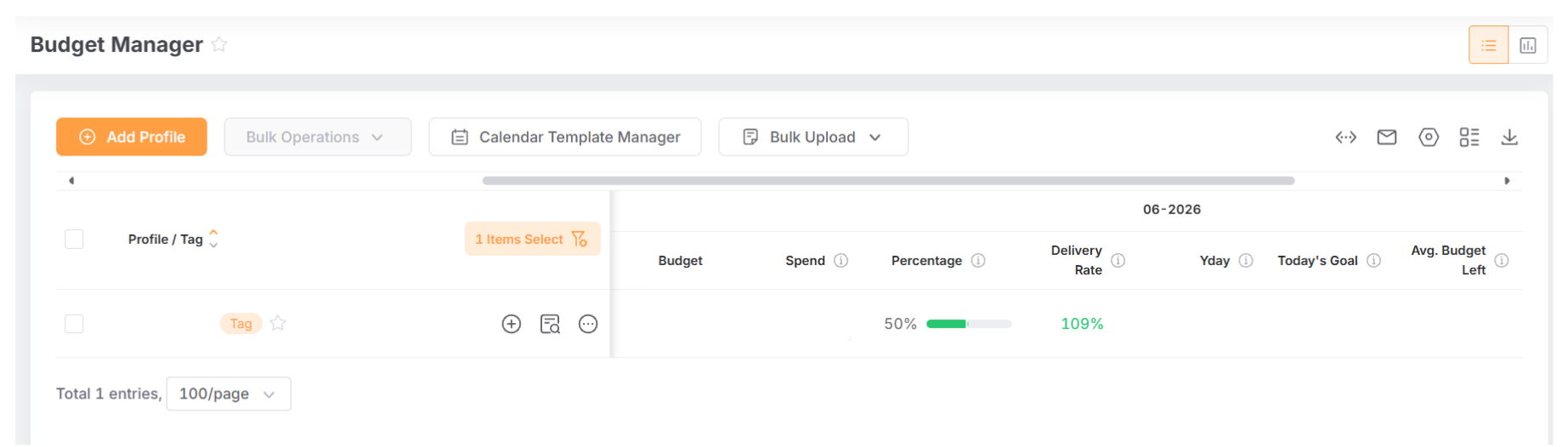
A daily budget in Amazon Sponsored Ads is not a hard cap. Amazon’s own policies allow spend to exceed the daily budget, and the structure of how budgets are averaged creates additional exposure that most marketers do not plan for.
Amazon calculates daily budgets as a monthly average, not a strict per-day ceiling. On high-traffic days, Amazon can and will spend above the daily budget to capture demand. The monthly average is designed to stay within your intended range, but individual days can run significantly over. During tentpole events like Prime Day or Turkey 5, the gap between your stated budget and actual spend can be substantial.
On top of that, Amazon’s budget rules and certain default settings can permit up to double the daily budget on a single day. A campaign budgeted at $100/day can legitimately spend $200 on a peak demand day.
How to Fix It
Where available, set a monthly budget cap as a secondary guardrail alongside daily budgets. This provides a ceiling that accounts for Amazon’s averaging behavior across the full calendar month.
For more reliable control, group campaigns into portfolios and apply a hard portfolio-level budget cap. Portfolio caps are the most dependable native mechanism for enforcing a true spend ceiling across multiple campaigns.
For high-volume Amazon accounts where manual monitoring is not operationally feasible, third-party marketing platforms like Pacvue, Skai, and Perpetua offer real-time budget monitoring and automated pause rules that can trigger before overspend occurs.
The Bigger Picture
Each of these campaign misconceptions points to the same underlying reality: Amazon’s ad platform is optimized to capture available demand, which can result in broader delivery than many advertisers expect.
Understanding these defaults and building your ad campaign structure around how Amazon’s platform actually behaves is what will take your marketing strategy from good to great.
At Brandwoven, we are specialists in ecommerce, online strategy, and product marketing. Connect with our team to set up a framework that puts your brand in control on Amazon.