Managing a Vendor Central (1P) account requires navigating a unique and often complex wholesale relationship with Amazon.
Unlike Seller Central, where brands act as third-party sellers, Vendor Central operates on a traditional retail model: Amazon buys inventory directly from your brand and resells it to the consumer. While this relationship provides incredible scale, it also introduces rigorous operational requirements, particularly when it comes to Purchase Orders (POs). For large brands, managing this constant flow of inventory requests requires dedicated teams and meticulous attention to detail.
When issues with POs arise, like shipment delays and system errors, inventory availability and sales can stall.
In this article, we’ll walk through how to troubleshoot the most common Vendor Central PO issues, starting with how POs work, why issues occur, and the practical steps you can take to resolve them. We’ll also cover solutions like Amazon’s Born to Run (BTR) program, which can help address gaps in demand and ordering.
Because Amazon controls ordering in Vendor Central, vendors must proactively influence demand and maintain high operational standards to ensure consistent POs.
Overview of the PO Process for Amazon Vendor Central Brands
In Vendor Central, Amazon acts as the buyer and initiates Purchase Orders for the products they want to stock.
Amazon generates replenishment POs on recurring weekly cadences, though ordering frequency varies by vendor relationship, category, and replenishment model.
How to Troubleshoot 6 Common Amazon Vendor Central PO Issues
Even with a solid grasp of the standard PO process, discrepancies inevitably arise.
Here are the most common issues and the steps to resolve them:
1. Lack of POs or Low Order Volume
Before diving into individual operational errors, a core issue can be the lack of POs or insufficient order volume.
Why Amazon might not generate enough POs:
- New product launches (no sales history or demand signals)
- Low in-stock rate (Amazon reduces ordering confidence)
- Profitability issues (margin is too low for Amazon’s retail model)
- High return or damage rates
- Weak PDP performance (low conversion or traffic)
To troubleshoot and resolve this, focus on improving your PDP conversion rate and traffic. Doing so will strengthen Amazon’s demand signals, increasing the likelihood of future POs. Some ways to do this include:
- Improving content (A+ Content, images, and overall PDP optimization)
- Driving traffic with ads
- Using Amazon Vine to generate reviews
- Leveraging Amazon’s Born to Run program
How Does Amazon’s Born to Run Program Work?
When demand signals are limited—especially during new product launches—vendors may need to proactively drive inventory into Amazon. This is where the Born to Run program becomes a useful tool.
Typically, you are at the mercy of Amazon’s algorithmic forecasting to generate POs. However, if you are launching a new product, anticipating a demand spike, or investing heavily in a marketing campaign, Amazon’s algorithm may not order enough stock, putting your product at risk of going out of stock (OOS).
To solve this, Amazon offers the Born to Run program (also referred to as BTR or B2R). The program is invite-only and allows vendors to initiate their own POs by telling Amazon exactly how many units they expect to sell over a 10-week “sellthrough period”. If approved, Amazon generates a PO within two business days, effectively jumpstarting the product’s sales movement.
Before deciding whether to utilize Born to Run, you should be aware that doing so comes with some distinct risks and limitations, in addition to offering more control over your POs:
- Sell-Through Fees: You must accurately forecast 10-week sales for the specific enrolled ASIN(s). If the inventory does not sell through within that period, you must choose between two costly preferences: Amazon will either return the unsold units (requiring you to refund 100% of the product cost plus a 10% shipping and handling fee) or Amazon will keep the units, and you must pay a 25% “retention fee”. Again, this is only a decision you’ll have to face if your product does not sell through as expected.
- Account Allowances: Amazon limits your Born to Run capacity based on a monetary account allowance (e.g., a $10,000 worth of units limit). Vendors must strategically choose which ASINs to submit so they don’t eat up their entire allowance on high-ticket items. We would probably not recommend this program for an ASIN that costs over $1,000 depending on the account allowance.
- Rejections for Prior Cancellations: Born to Run approvals are evaluated at the ASIN level and are typically intended for new products or additional inventory purchases. If your brand has recently canceled standard POs for a specific ASIN, the ASIN already has an active Born to Run offer, or the cost is too high to be profitable, Amazon is highly likely to reject a Born to Run request for that same product. This is exactly why proper management of your POs should be your top priority, before deciding whether to utilize a program like Born to Run.
While programs like Born to Run can help resolve gaps in demand, vendors must also execute proper operations once a PO is issued. This is where operational issues can arise.
2. Rejected POs & Compliance Issues
Once a PO is issued, vendors must go through a strict sequence of steps to remain compliant and ensure they get paid:
- Acknowledgment: Vendors must review the “unconfirmed” PO and either accept or reject the requested quantities. Vendors may choose to accept the entire order, perform a “hard reject” by declining all of the PO, or perform a “soft reject” by proposing adjusted quantities or revised ship dates based on available inventory and fulfillment capabilities.
- Amazon monitors PO acknowledgment timeliness and fill rates as part of operational performance metrics.
- Routing Requests: Once you accept a PO, you must submit a routing request to Amazon. This step communicates shipment details such as the inventory being shipped, carton and pallet counts, shipment dimensions, and packaging configuration.
- Routing Instructions & Ship Windows: Amazon will respond with specific routing instructions, dictating the carrier (e.g., UPS, freight) and establishing a strict “ship window” indicating the dates your product must be shipped out.
- Vendors are expected to ship within these assigned windows. Shipping early, late, or outside of Amazon’s routing instructions can result in compliance violations, chargebacks, delayed receiving, or refused shipments.
- Prep and Labeling: Every box must be properly prepped and labeled with an SSCC (Serial Shipping Container Code) label or Amazon Container Code (AMZNCC), which allows Amazon to identify the contents of the shipment through the associated Advanced Shipment Notification (ASN). Failure to properly map and label these boxes can result in shortage discrepancies, chargebacks, receiving delays, or Amazon rejecting the delivery altogether.
Even after a PO is accepted and shipped, issues can still occur during transit and receiving.
3. Shipment Tracking: Receiving Delays & OOS Inventory
It is common for vendors to ship inventory to Amazon only for the product to temporarily appear as out of stock or “unavailable” on the detail page for up to several weeks. This can happen when shipments are delayed in transit, inventory has not yet been received at the warehouse, or Amazon is experiencing receiving or inventory processing delays (which can commonly occur during peak seasons).
To research and resolve this issue within your account:
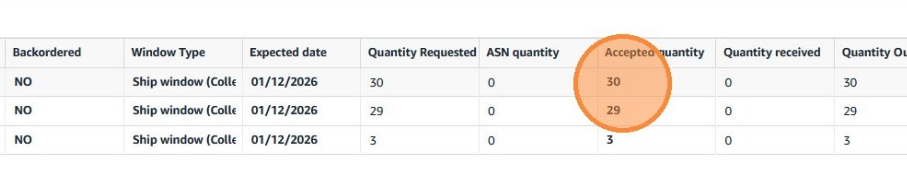
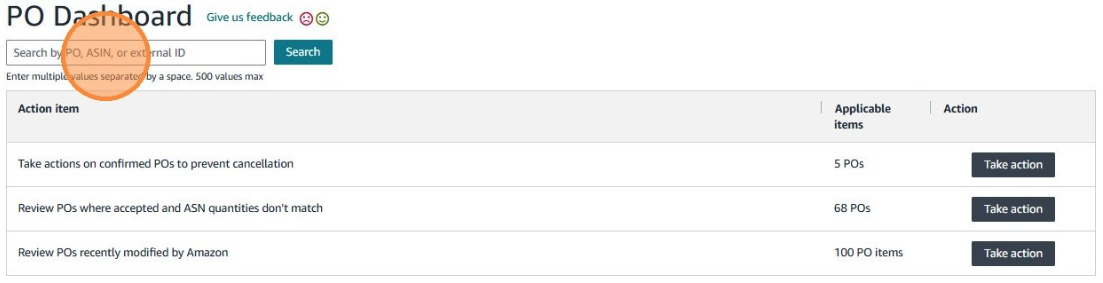
- Search your PO dashboard for the specific ASIN. Review the ordered, accepted, received, and outstanding quantities.
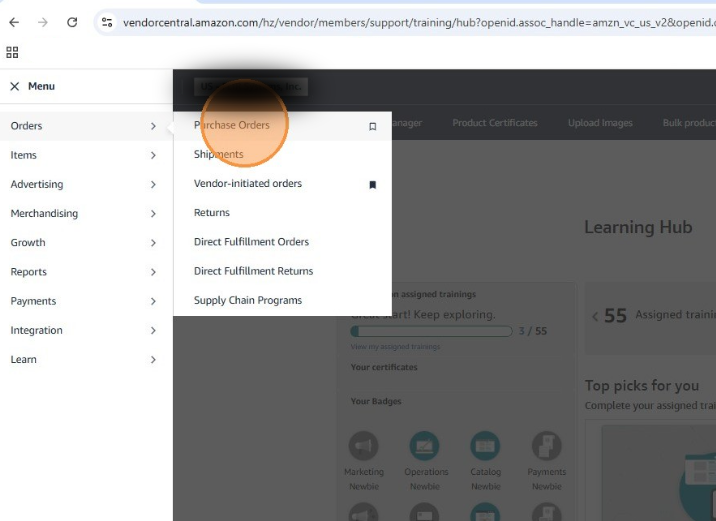
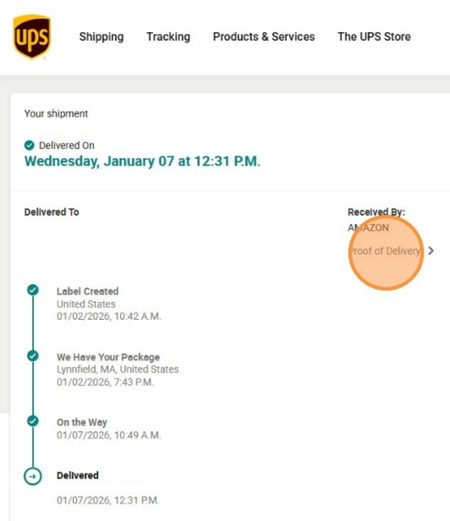
- Navigate to Shipments (Orders -> Shipments) and search by PO, ASN or ARN (Amazon Reference Number). If the item shows as delivered, but Amazon claims they did not receive it, you will need to retrieve a Proof of Delivery (POD) from the carrier (e.g., UPS or FedEx).
If the shipment has been sitting in Amazon’s warehouse for more than 2-3 weeks without being received into inventory, you should open a case with Amazon.
Keep in mind that Amazon generally only accepts disputes up to 90 days from delivery. Some disputes may still be reviewable after the standard recovery window; however, vendors should ideally submit disputes within 90 days to maximize recovery likelihood.
Carriers have limited windows for retaining PODs that range anywhere from 90-120 days for UPS, or 18-24 months for FedEx. Bill of Lading (BOLs) can also be requested and are typically kept on file for 3-7 years depending on the carrier.
4. Unapproved Routing Requests
Sometimes a brand ships product to Amazon before receiving an approved routing request or routing authorization. In Amazon Vendor Central, routing approval confirms that Amazon has assigned the shipment to a fulfillment center and authorized the delivery appointment process.
If a vendor ships inventory without following Amazon’s required routing procedures — such as shipping before routing approval, using an unauthorized carrier, or delivering outside the assigned window — Amazon may delay receiving the shipment, reject the delivery, issue compliance chargebacks, create shortage claims, or place the invoice on hold while the shipment is investigated.
As a best practice, check your PO shipment details to verify that a routing request has been successfully submitted and approved before shipping product to Amazon.
5. SKU Discrepancies and EDI System Errors
EDI errors are one of the most common hidden causes of rejected or unprocessed POs.
Some brands use EDI systems — or Application Programming Interfaces (APIs) — to automate the processing, acknowledgment, and management of Amazon POs.
Errors within these systems commonly occur due to mismatched product identifiers between Amazon’s data and the brand’s internal item mappings, which can lead to failed PO processing, canceled orders, and lost sales if not resolved quickly.
Example: A brand may configure its EDI system to identify Amazon PO line items using a specific product identifier, such as the internal SKU. However, Amazon may transmit the PO using a different identifier — such as a UPC, EAN, GTIN, ASIN, or vendor item number — depending on the catalog setup or EDI mapping configuration. If the vendor’s EDI mapping does not recognize the identifier sent by Amazon, the PO line may fail validation, create a processing exception, or cause the PO to be rejected automatically.
Before assuming the item is set up incorrectly in your catalog, review the “External ID” field on the PO. If it came in as an EAN instead of a SKU, you can simply open a support case with Amazon to have the identifier fixed for future orders, ensuring the EDI system accepts it moving forward.
6. Merging Duplicate ASINs & Navigating Open POs
Brands with duplicate ASINs often ask Amazon to merge them into the correct primary SKU as a catalog clean-up effort which ensures that PO information is always accurate.
Unfortunately, Amazon’s system may repeatedly generate errors blocking this merge from taking place. One reason this can happen is if there are any active, open POs tied to either ASIN, or if any of these other blockers exist:
- ASINs do not represent the exact same product, including mismatching UPCs, images, part numbers, or catalog attributes.
- One or both ASINs are flagged under parallel import designation.
- Different catalog owners (eg: independent brand subsidiary)
- ASIN is suppressed while the other remains active.
- Existing inventory on the source ASIN has not cleared yet (must clear before the merge can be completed).
The best path to resolution will depend on what type of blocker you’re facing.
If you are specifically dealing with a merging blocker due to open POs tied to either ASIN, we recommend looking at your PO dashboard to ensure all orders on the affected products are completely closed out. Once that is confirmed, try initiating another merge request with Amazon.
Take the Guesswork Out of Amazon Vendor Central with Brandwoven
Navigating Amazon Vendor Central is a full-time job. With complex PO procedures, rigorous shipping compliance, and the constant threat of algorithmic miscalculations, minor errors can quickly result in lost sales.
At Brandwoven, we believe that online marketplaces don’t have to be a pain point. As a full-service marketplace management agency, we act as the hands and feet of your Vendor Central business every day. From untangling complex SKU discrepancies and resolving suppressed listings, to deploying sophisticated inventory forecasting models that prevent costly stockouts, our team has the expertise to manage your catalog so that your team can focus on driving your business forward versus tedious backend work.
Our leadership team boasts an average of over 7 years in marketplace management and more than 10 years of brand-side experience. Whether you need help managing daily PO operations, navigating the Born to Run program, negotiating annual terms, or even evaluating a transition from Vendor Central to Seller Central, we offer comprehensive Amazon marketplace consulting and execution.
With an average client tenure nearly 4x the industry average, we partner with you for the long haul to drive revenue and reclaim control of your brand. Reach out to our team to start a conversation about how different our approach to marketplace management is.