Most content about Amazon AI optimization focuses on what to fix when things go wrong: suppressed product listings, flagged images, and compliance violations. However, this reactive lens misses the larger opportunity. Brands that treat catalog architecture as a strategic asset, built proactively and maintained consistently, avoid problems and build a compounding advantage that gets harder to displace over time.
This article covers the two AI systems reshaping Amazon product discovery and examines what consistent and complete product data optimization actually looks like across every content layer Amazon can read.
COSMO and Rufus: The Two AI Systems Reshaping Amazon Discovery
Before understanding how each system works, it helps to understand how they work together. Think of COSMO as Amazon’s distribution network, the behind-the-scenes infrastructure that sorts and catalogs every product, and determines what belongs where Rufus is the delivery driver. It surfaces what the network has already decided is a match and brings it directly to the shopper who asked. One system builds the knowledge and the other delivers it. The product data that feeds one feeds the other.
COSMO and Rufus both reward the same thing: catalog data that is complete, consistent, and coherent across every piece of content or data Amazon can read. If your product data is incomplete, inconsistent, or conflicting, COSMO cannot map it accurately, and Rufus has nothing to deliver. A driver can only deliver what is correctly catalogued in the warehouse. Brands that get this right are optimizing product listings for today’s algorithm and building an Amazon catalog that becomes more authoritative and high-performing over time.
To have your products stand out & be recommended by these new AI systems, you must make sure your products are correctly catalogued and well understood by both systems.
COSMO: The Semantic Network
COSMO, short for Common Sense Knowledge system, is the back-end engine powering Amazon’s search relevance.
COSMO uses large language models and knowledge graphs built from hundreds of millions of shopping interactions to understand the relationships between products, purchase contexts, and shopper intent.
For example, when a shopper searches for “water bottle that fits my car,” COSMO understands the shopper’s need for a specific diameter, confirmed cup holder compatibility, and leak-proof seal for a moving vehicle. Amazon products whose structured attributes and content communicate these specifics will surface for these SEO key phrases, even if their listings never use the word “car.”
COSMO also looks beyond Amazon. It cross-references external sources, DTC websites, distributor and reseller pages, and review sites, to build a fuller picture of each product.
Your catalog architecture extends well beyond Seller or Vendor Central, whether you know it or not.
Amazon Rufus: The AI Chatbot Delivery Driver
Amazon Rufus is where COSMO’s invisible work becomes a conversation with consumers. It operates as an AI powered shopping assistant on Amazon product listing pages and in SEO-powered search results.
For example, when a shopper asks, “What is the best water bottle for commuting under $40?”, it generates a tailored answer drawn from Amazon product page content, customer reviews, and Q&A data.
Rufus does not recommend products to shoppers that it cannot clearly understand. If critical use-case information is absent from your Amazon listing, the Rufus AI chatbot cannot surface your product in response to the questions shoppers are asking about that use case.
Amazon Catalogs: From Damage Control to Strategic Asset
The dominant conversation right now about Amazon AI focuses on what to avoid: keyword stuffing, suppressions, compliance violations, and conflicting backend attributes. This reactive framing treats catalog management as damage control rather than a strategic structural asset.
The brands that win in AI-driven Amazon discovery are not necessarily the ones with the biggest listings or the most content on their product pages. The brands that win on Amazon are the ones whose products are most clearly understood. Deep understanding comes from consistency, and consistency requires a deliberate content architecture, not a series of one-off content decisions.
Every time a brand populates a recommended attribute, aligns its off-Amazon copy, or writes alt text that reinforces product identity, it is strengthening a connection that compounds over time.
Every Content Source Amazon Reads & What to Put There
Consistency is not simply saying the same thing everywhere. It is about ensuring that every source of content Amazon can read tells a coherent, reinforcing story about what the product is, who it is for, and what it does. The goal of your catalog is to make Amazon’s AI confident in how to interpret and surface your products.
Amazon Product Titles, Bullet Points, and Descriptions
These three layers are the most documented in Amazon listing SEO resources. The core principle is intent density rather than keyword density; every element should communicate what the product is, who it is for, and what problem it solves, in language that mirrors how real shoppers describe their needs. Any product claim that matters for discovery must exist in structured text somewhere.
The less obvious point: your product titles, bullet points, and descriptions must be internally consistent. An Amazon title that positions a product as a professional tool while bullet points and descriptions target hobbyists creates conflicting messages. Amazon’s AI must choose which framing to trust, and ambiguity reduces confidence in how to surface the product.
Amazon A+ Content and Alt Text
Most brands treat A+ Content as a conversion tool: visual, brand-forward, designed to persuade. That is partially right, but it misses the AI dimension.
A+ Content is one of the few places where brands can communicate contextual narrative: use cases, compatibility scenarios, comparative positioning, lifestyle context.
Alt text on A+ Content image modules is completely underutilized by sellers, but it is a direct text input that Amazon’s AI can read. Treat each field deliberately. “Stainless steel insulated water bottle being carried in a hiking pack on a mountain trail” communicates far more than “lifestyle image” or “Water bottle”.
Amazon Brand Stores and Alt Text
Amazon reads Brand Store content, including headlines, body copy, and alt text, and considers this as additional information about a brand’s product catalog.
A Brand Store that uses different terminology than the corresponding product pages introduces fragmentation into the catalog identity.
Many sellers almost never populate the alt text on Brand Store images optimally, representing a completely untapped content field.
Listing Images
Amazon listing images should visually confirm what the product page text claims. If your bullets say the product fits in a jacket pocket, one image should demonstrate that literally.
The text on primary and secondary images should describe what is shown and reinforce product attributes, not as a decorative label, but as a deliberate extension of the listing narrative.
Videos
Amazon’s AI does not currently read video content directly; the visual and audio layer is not parsed for semantic meaning the way text is. The readable layer is the text associated with the video: titles, descriptions, and captions.
A video titled “Product Demo” contributes nothing to the algorithm. A video titled “How to Adjust the Harness on the TrailPro 45L Backpack” is a keyword-rich, intent-aligned content field.
Amazon Advertising Copy
Amazon ad copy is indexed content. Sponsored Brand headlines and Sponsored Display copy contribute to the broader content ecosystem surrounding a product.
When ad creative uses different language than the product page, it creates inconsistency in how the product is characterized by Amazon. Ad copy should be treated as an extension of Amazon listing messaging, not a separate creative exercise.
Amazon Backend Data: Flat Files, Category Listings Report, and NIS Templates
This is the highest-leverage territory in product catalog optimization, and the most overlooked in most Amazon listing SEO content you can find online.
- Required vs. recommended attributes. Most brands populate only the required fields in standard flat file templates. Recommended attributes are where COSMO finds additional contextual data that enables non-keyword matching. A product with intended use cases, compatibility details, and contextual attributes fully populated will surface across a far wider range of relevant queries.
- The Category Listings Report. This tool can provide additional attributes associated with your category that do not appear in standard category specific flat file templates. Navigate to Seller Central → Reports → Inventory Reports > Category Listings Report. Identify recommended attributes not yet populated, or that are incorrectly populated, export, add the missing/corrected data, and re-upload via flat file.
- NIS (New Item Setup) templates. Attributes captured at item creation often persist and are harder to overwrite later. Getting them right at launch matters more than most brands realize.
- Attribute-to-listing consistency. Backend attribute values that contradict front-end copy create conflicting messages. If your bullet says “fits 15-inch laptops” but the compatibility attribute says “13-inch,” Amazon’s AI will have less confidence in your product data.
Customer Reviews
Amazon’s systems extract attribute information from review text. If dozens of reviewers describe your product in a use case that your listing never mentions, Amazon learns that use case is relevant regardless.
Brands that respond to reviews with specific, attribute-rich language are adding readable content to the listing. A response that names the product, references the use case, and reinforces a key specification contributes more than a generic thank-you.
Example: “Thanks for using your [Product Name] for [Use Case], it was designed specifically for this due to [Product Feature], so we’re glad the [Product Benefit] was helpful. If you ever want to try the [Product Variant] for [Alternative Use Case], it’s built with the same [Product Material].”
Summary: How To Optimize Each Section of Your Amazon Product Page
- Titles, Bullet Points, and Descriptions: Consistently communicate what the product is, who it is for, and what problem it solves, in language that mirrors how real shoppers describe their needs
- A+ Content and Alt Text: Include use cases, compatibility scenarios, comparative positioning, and lifestyle context in image alt text
- Brand Stores and Alt Text: Use the same terminology as your corresponding product pages with descriptive alt text in images
- Listing Images: Visually demonstrate what the listing text claims to reinforce use cases and attributes
- Videos: Write keyword-rich text in the associated titles, descriptions, and captions
- Advertising Copy: Use the same terminology as your corresponding product pages across headlines and copy
- Backend Data: Go beyond the minimum required fields and fully populate attributes for maximum contextual data
- Customer Reviews: Respond to reviews with specific product names, use cases, and specifications as additional readable text on the listing page
The Hidden Risk: Third-Party Catalog Corruption
Amazon stores far more product attributes than what appears in standard flat file templates. These backend fields can be overwritten by other sellers, distributors, catalog merges, or bad actors, often without any notification to the brand.
Even when a brand’s flat files appear correct, hidden or conflicting catalog attributes can silently undermine listing performance. Brand Registry is often marketed as giving brands ultimate catalog control, while the reality is more conditional. Third-party sellers, distributors, and Amazon’s own internal systems can override brand-submitted data, or they can fill in missing content gaps — for example, when required or recommended fields are incomplete. What Brand Registry actually provides is an elevated trust weighting for your contributions, improving the likelihood that your data wins in Amazon’s internal contribution hierarchy.
The path to Amazon catalog control runs through two parallel paths: Brand Registry is needed to give your brand’s content more weight as the trust foundation, and comprehensive attribute data coverage as the substance that extra weight protects. One without the other leaves gaps for others to corrupt your listings.
When backend fields are populated with incorrect classifications, conflicting category assignments, or mismatched specifications, the consequences accumulate silently:
- A reseller edits a title.
- A distributor submits incomplete attributes.
- Another seller adds backend keywords that conflict with the brand’s positioning.
Individually these changes seem small, but collectively they fragment the coherence Amazon’s AI relies on and can suppress performance across the entire catalog.
Off-Amazon Content: Brand Websites, Retail Partners, and Resellers
COSMO cross-references external data sources to build its understanding of products. Your D2C website, retail partner pages, and third-party product descriptions all contribute to Amazon’s external data pool. Most brands do not realize that a poorly written off-Amazon listing can work against their ability to optimize for Rufus AI visibility.
Proactively provide your retail partners with approved product copy, a simple content syndication sheet, as well as manage your own DTC site to the same content standards as your Amazon listings.
AI-Ready Listings: Amazon Catalog Audit Checklist
Step 1: Build the Foundation
Verify Brand Registry ownership of each ASIN to ensure Amazon truly considers you the brand owner. Here are some actions you can review and update to confirm this:
- Byline correctly linking to your brand store
- Content getting pushed through without generic seller support responses
- Brand codes aligned
- NIS templates correctly displaying your brand name in the brand name drop down. Ensure all NIS template fields are complete and accurate for new SKUs before launch.
- Seller or vendor accounts correctly linked to brand registry
- Ad console shows all active ASINs for the Brand
- Manufacturer names aligned
Step 2: Complete Attributes
- Download the Category Listings Report for each primary category. Identify all recommended and required attributes not currently populated, or incorrectly populated, and fill them in completely and accurately.
- Cross-reference backend attribute values against front-end copy. Resolve any contradictions.
- Populate intended use, compatibility, and contextual attributes as these are the fields that enable non-keyword matching in COSMO.
Step 3: Ensure Content Consistency
- Audit titles, bullets, descriptions, and A+ Content across your Amazon listings for internal consistency. Remove conflicting positioning between sections.
- Write deliberate alt text for all A+ Content image modules & Brand Store images.
- Review video titles and descriptions for all products across your Amazon catalog. Ensure they communicate product attributes, not just “Product Demo.”
- Audit Amazon Sponsored Brand headlines for alignment with listing messaging.
Step 4: Align Off-Amazon Listings
- Compare Amazon listings against your brand’s D2C website and key retail partner pages. Align product names, specifications, and use-case language.
- Create a content syndication sheet for resellers and retail partners with approved product copy and preferred terminology.
- Review your site for any claims absent from or inconsistent with your Amazon listings.
Step 5: Monitor for Ongoing Success
- Review Brand Analytics and Search Query Performance reports monthly for additional Amazon SEO listing optimization opportunities. Watch for drops in impressions or CTR as early indicators of catalog issues.
- Run an Amazon Category Listings Report audit quarterly to catch third-party overwrites, new required fields, and depreciated variation themes before they compound.
- Monitor customer reviews for recurring attribute mentions, both positive use cases you have not claimed, and negative characterizations to address.
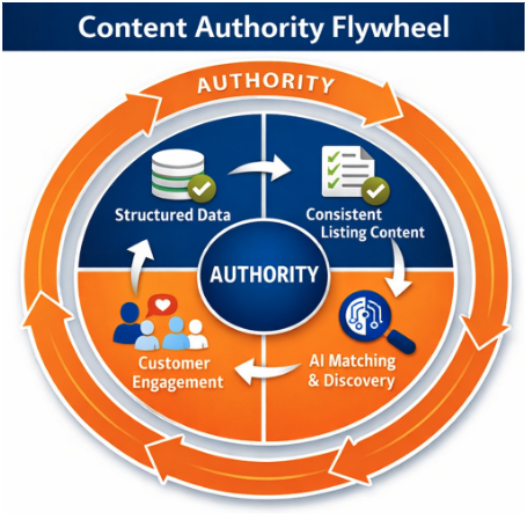
The Content Authority Flywheel
The content structure required hasn’t changed dramatically, but what has changed is the importance of completeness and consistency across every area of content we can impact, front-end and backend, and how directly that now translates into discoverability:
- Complete structured data that tells the full story of what a product is and who it serves.
- Consistent messaging across all sources of content.
- Retail websites that reinforce rather than contradict Amazon listings.
- Alt text that communicates key messaging rather than checking the box.
- Video & Ad titles that align with the hero features of your product.
Catalog authority is a compounding cycle. Brands that build consistent architecture create an advantage that becomes harder to displace over time: Complete, consistent product data → Clearer AI interpretation of listings → Stronger discovery and placement in relevant results → Improved shopper engagement (clicks, conversions) → Reinforced product authority in Amazon’s catalog → Better positioning as AI capabilities expand.
The inverse is equally true. Brands that allow catalog instability to persist, through inattention to backend fields, inconsistent off-Amazon messaging, or incomplete attribute population, give Amazon’s AI a fragmented picture of their products.
Conclusion
Amazon marketplace has moved decisively towards adding AI-driven discovery (alongside traditional Search & Categorical browsing). COSMO and Rufus represent a structural shift in how products are found, evaluated, and recommended.
None of this requires a large budget, but it does require time, planning, and discipline. Perfecting your Amazon listings only requires treating the foundational catalog architecture with strategic discipline: built intentionally, maintained consistently, and audited systematically. The brands that do this are building a catalog that Amazon’s AI will understand more clearly with every update, every new data point, and every shopper interaction. That clarity is catalog authority, and that’s what compounds into sales.