Article
Amazon Q4 Demand Planning: Inventory Forecasting & Capacity
When preparing to ship inbound inventory during busy sales seasons and events, like Prime Day and Cyber Monday, sellers must be aware of various factors that impact the accuracy of their forecasts:
- Past & current sales trends
- Buy box performance
- Inventory position at Amazon
- Competitor & market trends
Sellers also need to align their forecasts and ordering with future advertising campaigns and promotional plans to predict how much space their inventory will use at Amazon, and whether that estimated usage is over/under Amazon’s capacity limits for their account.
Once forecasts are set and the required space is determined, a seller may find that Amazon is not allotting them enough storage capacity to support their forecast. At this point, a seller can:
- Bid for more storage capacity
- Submit item-level exemption requests so certain items can still be supported
These steps are necessary to make sure sellers have their ideal inventory levels at Amazon, and products are retail-ready with Prime eligibility when their season or big sales events begin.
Inventory Forecasting Process, Timeline, and Tips for Meeting Demand Ahead of Q4
Using Historic Sales Data as a Guide
Using historic sales data from Amazon, a seller can begin to estimate their average monthly or weekly sales levels for each product. If there is at least one year of sales data for a product or product family, seasonality patterns should begin to emerge. However, historic data does not capture the full story of inventory position and buy box ownership of each item. To gauge the full demand potential for a product on Amazon marketplace, it is important for forecasts and trend lines to consider out-of-stock (OOS) periods and historic boy box levels.
Accounting for Out-of-Stock Product History
Periodic out-of-stocks and buy box fluctuations will cause seasonality trends to skew if they are not accounted for. For items with known out-of-stocks leading to low sales periods, it is important to not let that drag down the estimated future sales estimates. Periods with zero sales due to out-of-stocks should be omitted from the data used to set trend lines.
Sales from past periods with partial out-of-stocks can still be very useful data points. Consider how many days a product was OOS during a given period, and how many sales were made while it was in stock during that same period. This will help you determine the estimated missed sales for that period, as well as an estimate for what total sales would have been had the product been available for purchase.
Tracking Buy Box Percent Over Time
It is also important to track your Amazon products’ average buy box percentage to understand if they have been gaining, losing, or maintaining the average. Products may temporarily lose the buy box for a variety of reasons, causing low data points that should be ignored. Sudden, temporary buy box gains can also skew seasonality trends up. A SKU-level analysis of buy box growth or loss period over period helps determine the slope for modeling forecasts.
If demand starts to deviate from your initial forecast, first investigate stock levels and buy box ownership. If those are steady, look deeper into other market forces to determine the cause of those deviations.
Once you have identified any outliers in sales data, use the following to lock in a forecast for each product:
- Account for out-of-stocks and buy box changes at the SKU level
- Estimate true demand levels from previous periods
- Seasonality curves established from existing products and product categories can be used to help set forecasts for new, similar products
Considering Products on Discount or Promotion
Some products may be placed on discount or are running promotions to help drive short-term sales, but consideration should be given whether to include these spikes in your seasonality modeling. It should be noted that, when a product goes on sale, how much of a discount was provided and how many additional sales were made during that promotional period so that proper price elasticity analysis can inform your forecast modeling. When the product goes on sale again, the forecast should consider that previous discount and the accompanying sales lift, applying similar adjustments to forecasts during future promotional periods.
Reviewing & Editing Forecasts
It is important to investigate causes of short-term demand changes before reacting and editing your established forecast. If there is limited sales history, a seller may need to be more reactive to recent sales trends to catch growing momentum the forecast didn’t previously account for.
Regularly reviewing forecast accuracy will help determine when it may need to be updated. A common forecast accuracy formula used is MAPE (Mean Absolute Percentage Error). This is a periodic forecast measurement that will show a seller how well their forecast is performing compared to their original expectations. Low MAPE indicates a strong forecast. If MAPE is a high percentage for a product, and sales have been deviating from your forecast for multiple periods, it may indicate a change in the market and that it is time to adjust the forecast.
We recommend reviewing forecasts against actual sales, using a standard forecasting performance measurement such as MAPE, and adjusting the forecast where needed on a monthly or quarterly basis. Having a process in place will help sellers be more confident in their forecasts and easily see when sales deviate from expectations.
Forecasting Inventory for Black Friday
Given Amazon’s published lead times and receiving deadlines, units for Black Friday need to be inbound by early October. Conduct forecast reviews in August and September to make any important changes or overrides before the season starts.
It is also important, if making the decision to increase forecasts before a sales season, to communicate the updated ordering plan to your production team as soon as possible so they may begin building the inventory needed to meet the upcoming demand.
Monitoring Capacity Usage, Estimating Future Needs, & When to Place Bids
Calculating Inventory Levels at Amazon
Using Amazon inventory reports, you can check current inventory levels—both on-hand and inbound to Amazon—using individual unit dimensions. With this inventory data, you can calculate your expected cubic feet of inventory in Amazon’s network.
Use this to calculate cubic ft. for on-hand and inbound units (in inches):
((Unit Length * Unit Width * Unit Height) / 1728) * Units On-Hand)
Keeping Product Information Up-To-Date
If you create an estimate for total cubic ft. in the Amazon network, and the reported usage in the Amazon Capacity Monitor doesn’t closely align with that estimate, it may be an indicator that Amazon has inaccurate product dimensions on file. It is important to audit product data in Seller Central regularly to ensure any mismeasurements are corrected. Not only does this inform capacity storage, but you could be overpaying for FBA fulfillment & storage fees. The same goes for any changes in your product dimensions that may occur. To update the product dimensions on file with correct data, you may need to submit cases and provide new product information to Amazon.
Predicting Future Capacity Usage
To predict future capacity usage, calculate your projected inventory usage by month. Start with current inventory levels, then account for your sales forecast and expected sell-through, and combine that with your ordering plan to get an estimate of your expected future on-hand units and inbound units by month. Combine these estimates to find the total expected units you will have in the Amazon network for each future period. Lastly, convert those expected total in-network units to estimated cubic feet. This will allow you to check your estimated future cubic foot usage against what Amazon reports they will be allotting by month in their Capacity Monitor tool in Seller Central. This will help you determine if you should be placing a bid for more space in the near term to ensure there is enough available space to send in inventory for key receiving dates (i.e. ahead of big sales).
Shipment Timelines for Amazon Q4 2026 Events
Key Dates for receiving inventory at Amazon for Q4 2026 events are as follows:
| Amazon Sales Event | Shipment Type | Inventory Must Arrive By |
|---|---|---|
| Prime Big Deal Days (October 2026) | AWD | 9/2/26 |
| FBA – Minimal Splits | 9/9/26 | |
| FBA – Amazon Optimized Splits | 9/16/26 | |
| Black Friday & Cyber Monday (November 2026) | AWD | 10/14/26 |
| FBA – Minimal Splits | 10/21/26 | |
| FBA – Amazon Optimized Splits | 10/28/26 |
Under these timelines, sellers should ship Prime Big Deal Days inventory in August, and units for Black Friday & Cyber Monday in September or early October at the latest.
Bidding for Q4 Capacity at Amazon
Capacity limits in August, September, and October will be especially critical to monitor as these are the key months sellers may want to bid for more space if they have determined that Amazon has not allotted them the ideal amount of space needed to meet their Q4 forecast.
When applying for additional capacity at Amazon, it is important to note that it can take 3-4 business days for requests to be reviewed, and often times longer leading up to Q4. Once a limit increase is granted for a future month, that additional space can be shipped up to one month early as an “early release” capacity. For example, if a seller bids for and is granted additional space in October, that extra capacity in cubic ft. will also become available to ship against in September (as early release capacity). If you’ve determined that you will need more capacity in October to land seasonal products at Amazon by the end of the month (in time for November sales), it is best to submit a bid for more space as early in September as possible.
Sellers can bid for additional FBA storage capacity by specifying the reservation fee they are willing to pay per cubic foot. Amazon awards space based partly on bid competitiveness, but the bid does not necessarily become the seller’s final cost. Amazon provides a performance credit for every dollar in sales generated using the additional capacity. Strong sales can therefore reduce, or fully offset, the reservation fee, while underperforming inventory leaves the seller responsible for the remaining balance.
SKU-Level Shipment Blocks, Making Room for Inventory Ahead of Sales, & When to Remove Seasonal Inventory
Amazon’s HDOS Policy & Applying for Exemptions
Outside of account-level capacity constraints, Amazon may also apply SKU-level shipment constraints (for a variety of reasons). High Days of Supply on-hand and Aged Inventory removals are two blockers that can be avoided through well-timed promotions or removals. Products that Amazon deems to have high days of supply, or products that have been recently removed/returned may have individual shipment blockers applied at the SKU level. To avoid these blockers which restrict you from sending certain products to Amazon, it is important to understand how these blockers are applied.
High Days of Supply Blockers (HDOS) are applied by Amazon to help sellers avoid excess inventory and reduce excess storage surcharges. Items that Amazon forecasts to be more costly to keep in-stock and pay storage fees on—compared to reducing through advertising, liquidation, or removal orders—will be flagged by Amazon as estimated excess units. SKUs with inventory deemed excess can be found on the FBA Inventory page under the Inventory Health Status filter (select “excess” to see all SKUs Amazon has assessed to have excess units).
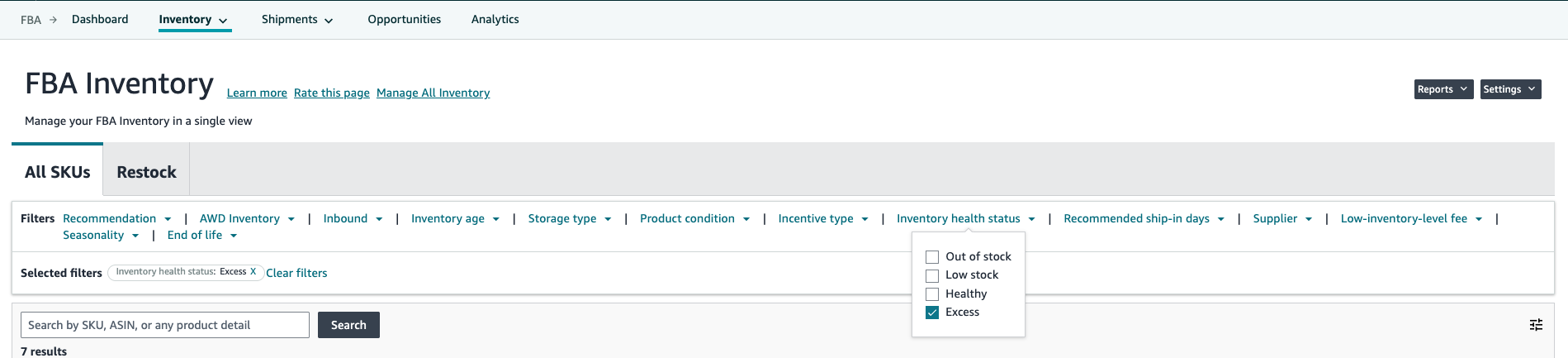
On the Managing FBA Product Level Shipment Restrictions page, Amazon states “we may restrict products with inventory well beyond regular replenishment levels to continue providing a high-quality fulfillment service for all sellers to maintain healthy inventory levels.” Amazon does not give a guarantee of when blocks will be applied to SKUs with excess inventory, but that they reserve the right to block shipment of those at times they deem the space is needed to service other sellers. HDOS blocks are often put in place before big sales periods at Amazon, such as Prime Day and Turkey 12.
Depending on a product’s forecasted seasonality, recent sell-through, and total time on Amazon, sellers may need to send inventory for new or seasonal demand that Amazon has not yet been able to account for. If a seller has found themselves blocked and would like to send units of a SKU blocked by HDOS, Amazon offers an ASIN block exemption tool. If blocked in the shipment workflow, the corresponding error message will provide this link. Within the exemption tool, Amazon will ask for shipment quantity, the reason, and the period in which you are requesting the exemption for. The primary reasons Amazon offers when submitting exemptions are:
- Seasonal Product
- New Product
- Promotions and Deals
- Unexpected increases in demand
- Inventory needed for sales off Amazon
Sellers can still submit a request for any reason, even if none of the above apply.
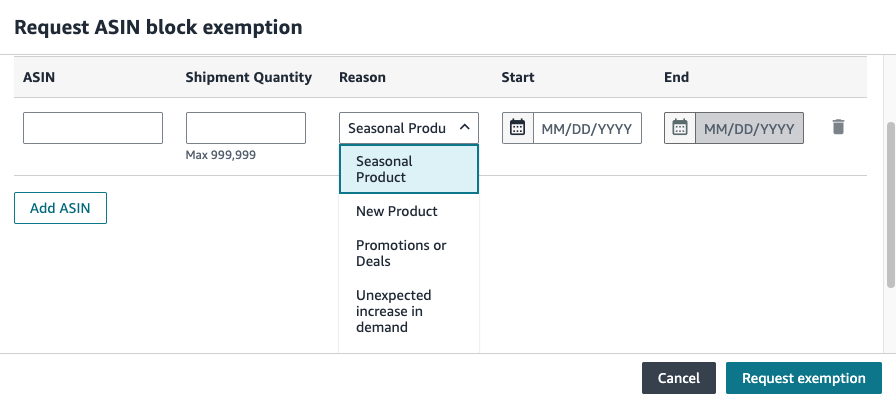
Sellers may only submit one exemption request per day with up to 10 ASINs, with a maximum of five requests per week.
Exemptions can be submitted manually within Amazon’s system (i.e. one-by-one) or through a bulk upload option which allows for ten SKUs to be included.
Note that requests take at least 24-hours to review, and Amazon reserves the right to deny any request if the seller’s IPI score is below their performance benchmark or if the seller has already received an exemption within the same week.
Amazon’s Aged Inventory Surcharge Removal Order Shipment Blocker
SKUs with aged inventory units that have been removed from Amazon will have temporary shipment restrictions. This aims to ensure that items which have been previously overstocked will not immediately become overstocked again after the removal order has been initiated.
Amazon also restricts removal inventory from shipment creation for 90 days as a push for more efficient inventory management. Under Fulfillable Inventory settings, if you have automated removals set up on your account, it is important to consider inventory age.
If a seller has a highly seasonal product and there are excess units at Amazon once their season has ended, there are two ways to deal with the overstock:
- Additional discounts, sales, or other promotions during the off season
- Through removal orders
When adjusting the “inventory age for automated removal” setting, sellers should reference their forecast and ordering plan to know when their next season starts/when inventory will be needed again. To ensure seasonal products are not blocked from being shipped to Amazon (due to aged inventory removals), sellers should either set their Inventory Age for automated removal to at least 90 days before their next season begins or set the removal age to a timeframe well after their next season begins.
Example: If a product’s season runs from November through December and units remain after the season has ended, the seller should consider setting the age for removal of those products to either 7 months or the longest possible 12 months. At 7 months, inventory that was received in November and December but did not sell through will be automatically removed from Amazon in June and July—over 90 days before new units will be called for in the next season, October. However, if the product also has strong sales spikes outside of its regular season, or if it is cost prohibitive to remove the items from Amazon due to size & weight, it may be worth setting the age for removal to 12 months. This would ensure that units were not removed in the Summer and could be sold during Prime Day and Prime Big Deal Day sales events. These units would not be removed until the last possible moment in mid-November and December, allowing units for the upcoming season to be sent in October and early November without any aged inventory shipment blockers being applied.
Items with units over 180 days old at Amazon will be charged additional aged inventory surcharges. Setting the removal setting to 12 months (instead of 7) in the example above would incur 5 months of additional escalating fees.
Monitoring overstocks will help you identify any SKUs that should be put on additional promotions or manually reduced through removal orders before automated removals are needed. Running discounts and promotions or initiating removals for SKUs with overstocks or aging inventory well in advance of the next sales season will avoid any hindrance on your ability to ship when it matters most.
Key Takeaways
- Once sellers have forecasts in place aligned with their promotional strategies, seasonal and YoY trends, buy box trends, out-of-stocks, and an ordering plan that accounts for order cycles and stocking policies, they will have a good idea of what units are needed to send to Amazon and when to have that product inbound by.
- Once forecasts and ordering plans have been set, you may determine that more space is needed beyond what Amazon is allocating in order to meet your forecast and big seasonal sales swings. In this case, submit a bid for additional space at Amazon to ensure there is enough room to ship against early enough for you to still meet the receiving deadlines.
- You may need to submit SKU-level exemption requests ahead of big sales events to provide Amazon context as to why you want to ship additional units for SKUs that have been flagged as having high days of supply or excess units on hand.
- In addition to monitoring and managing your capacity limits to meet your forecast and ordering plan, it’s important to manage overstocked and aging inventory from the previous year. Sell through those units using promotions or removal orders.
- Your main goal should always be to ensure that the proper amount of storage capacity is available for your next big sales season.